Chzzk (CHZZK) & YouTube
Lossless High-Speed Downloader
Simply paste your Naver CHZZK (VOD/Clip) or YouTube (Video/Shorts) URL,and download pristine 4K & 1080p FHD MP4 files and audio (.m4a) with zero re-encoding loss.
"Distributed officially via GitHub Releases. Verify binary integrity with cryptographic SHA-256."
Downloading modified or re-uploaded files from third-party mirrors, forums, or Discord is risky.
ErrorLedger distributes official builds via GitHub Releases alongside published SHA-256 checksums and multi-engine VirusTotal scan reports.
Native Stream Downloader (Direct Official CDN)
This application simply retrieves the public progressive MP4 media stream URL served by Naver CHZZK's official CDN for standard web playback, and saves it locally. It performs zero exploit techniques, zero privilege escalation, and zero modifications to your operating system.
Isolated Local Web Server (Runs on your PC)
The utility launches an ultra-lightweight web server strictly inside your own computer (http://localhost:5000). No sensitive account tokens or private telemetry are ever sent to unknown external servers.
Windows SmartScreen "Unknown Publisher" Notice
Because this is an independent, free open tool without a multi-thousand dollar commercial EV code-signing certificate, Windows Defender SmartScreen may display an "Unknown Publisher / Windows protected your PC" prompt on first run.
This is standard for independently published software. Verify the SHA-256 hash if desired, then click [More info] → [Run anyway].
Cryptographic Verification (SHA-256 & VirusTotal)
You can verify the authenticity and integrity of your downloaded binary using Windows PowerShell or inspect the VirusTotal report:
007F51936190318FC32602021D8DE0B1A51471B6C161FD6190DCFA1B009D8099Get-FileHash Chzzk_Downloader.exeIntuitive & Modern User Interface
Designed with CHZZK's authentic dark aesthetic and neon green accents for a seamless experience.
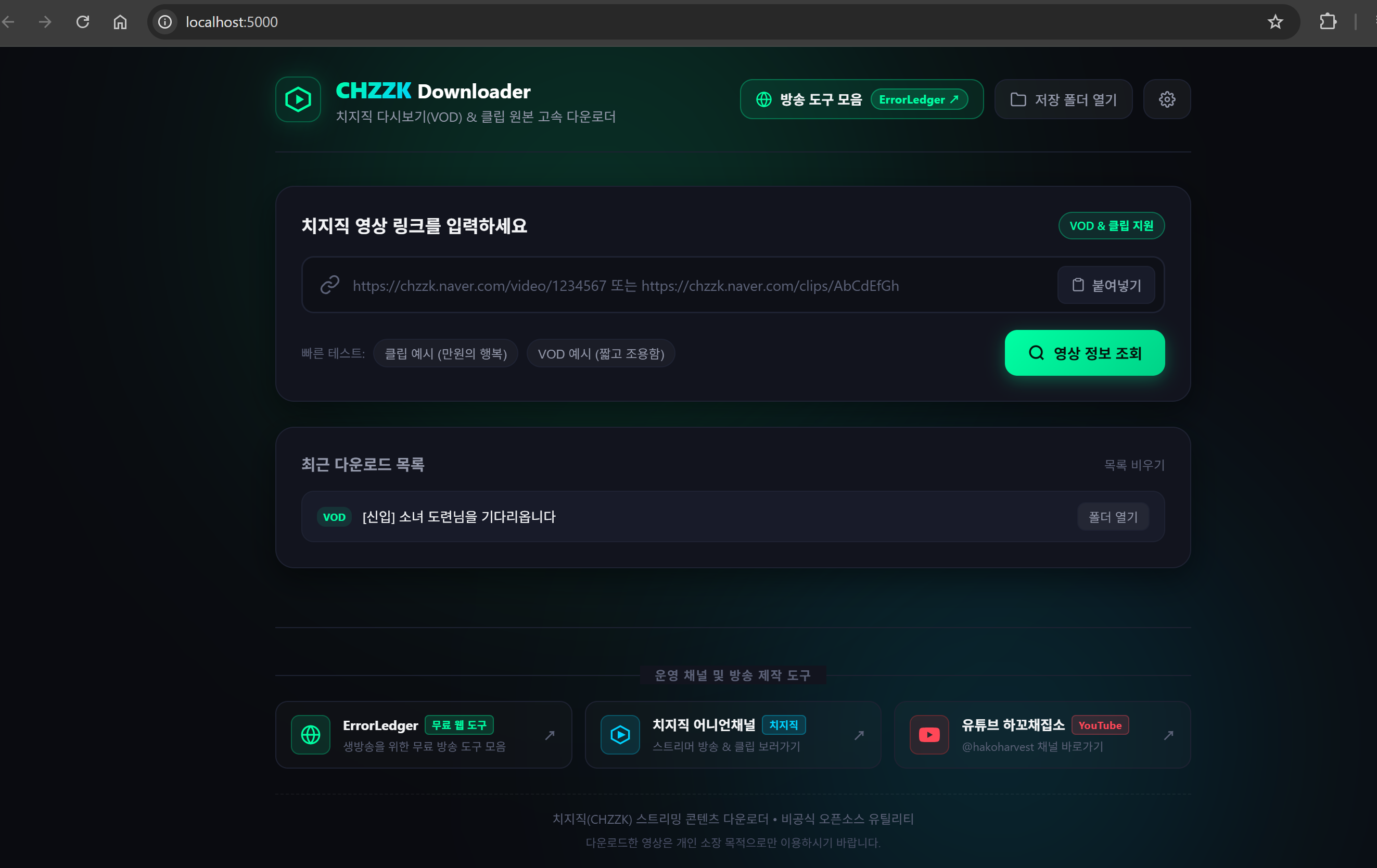
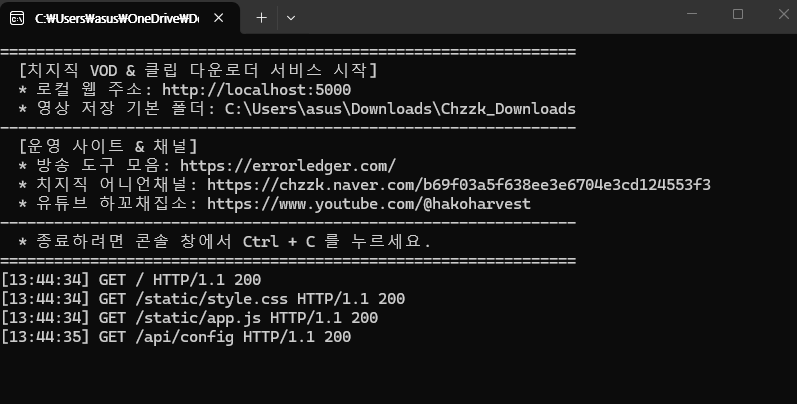
imageio-ffmpeg is bundled automatically for seamless 4K/FHD merging. Double-click launches the server, and Ctrl + C safely shuts it down.6 Key Advantages Over Other Sites
No paywalls, no download quotas, and zero quality compression.
1. Chzzk & YouTube Multi-Platform
Download standard YouTube videos, YouTube Shorts, and shortlinks (youtu.be) alongside Naver CHZZK VODs and clips.
- CHZZK VODs (
chzzk.naver.com/video/...) & Clips - YouTube standard videos & YouTube Shorts
- Resolutions up to 4K / 1080p FHD plus audio extraction (
.m4a)
2. Automated Bundled FFmpeg Engine
Zero manual setup required. imageio-ffmpeg is bundled directly within the executable.
- Automatically multiplexes video and audio streams seamlessly
- No external dependencies, Python runtimes, or system PATH editing needed
- Lossless stream preservation with zero sync drift
3. Session Download Queue & Background Worker
Non-blocking downloads allow you to search and inspect new videos while active jobs download sequentially in the background.
- Sequential queue worker prevents network bandwidth and CPU bottlenecks
- Consistent session order numbers (
#1,#2,#3...) - Live metrics: progress bar, speed (MB/s), ETA countdown, and status badges
- Cancel individual jobs, cancel all remaining items, or clear completed items
4. Multi-URL Batch Input & Real-Time Title Resolution
Paste multiple links separated by newlines to queue dozens of videos at once.
- Auto-expanding multi-line textarea with intuitive Ctrl + Enter submit
- Dynamic action button: switches from Single Fetch to [🚀 Add N Videos to Queue]
- Parallel thread pool (
ThreadPoolExecutor) resolves video titles in 1–2s - Collision-safe filenames save directly to
[Title].mp4with(1),(2)fallbacks
5. Live Telemetry & One-Click Folder Reveal
Monitor download throughput in real time and access files immediately upon completion.
- One-click [Open Saved Folder] reveals downloaded MP4 files in Windows Explorer
- Custom download directory selector in Settings (store to external drives, etc.)
- 19+ adult broadcast cookie authentication (
NID_AUT,NID_SES)
6. 100% Free Forever • Unlimited
Unlike commercial downloader websites, there are no artificial throttles, subscriptions, or predatory popups.
- No account registration or login required
- Unlimited downloads with no file-size caps
- Clean, ad-free local user interface
Quick 1-Minute Getting Started Guide
No installer required. Simply download and double-click to launch.
Download the Executable
Click the [Download Chzzk & YouTube Downloader] button above to download Chzzk_Downloader.exe to your computer.
Double-Click to Launch (Recommended)
Double-click Chzzk_Downloader.exe. The terminal will start the server and automatically open http://localhost:5000 in your default browser.
http://localhost:5000 manually.Paste Chzzk or YouTube URLs
Copy your CHZZK (VOD/Clip) or YouTube (Video/Shorts) URL. For batch downloading, simply paste multiple links separated by newlines into the input box.
Select Quality or Batch Add to Queue
For a single video, select your preferred resolution (4K, 1080p, audio) and download. For multiple URLs, click [🚀 Batch Add to Queue] to download in sequence.
Open Saved Folder
When download finishes, click [저장된 폴더 열기 (Open Folder)] to view your pristine video file in Windows File Explorer!
For Developers & Python Users: Run from Source
You can also run the application directly from source on Python 3.9+:
python app.pyAfter starting, open http://localhost:5000 in your browser for the same graphical UI.
Default Save Location & Custom Folders
Downloaded files are stored by default at:This PC > Downloads > Chzzk_Downloads
To save to an external hard drive or custom workspace, click the [Settings (Gear)] icon in the top right corner of the web interface anytime.
Copyright & Usage Disclaimer
- This program is an unofficial open utility developed for personal archival, educational, and research purposes.
- All copyrights, trademarks, and intellectual property rights in downloaded video content belong to the respective streamers and original copyright holders (Naver CHZZK).
- Redistributing, commercially broadcasting, or re-uploading protected content without the copyright holder's authorization may infringe applicable copyright laws. The user bears full legal responsibility for how downloaded content is used.
Frequently Asked Questions
Q. Does it support YouTube videos and YouTube Shorts?▾
Yes! The v2.0.0 update introduces full support for standard YouTube videos, YouTube Shorts, and shortlinks (youtu.be) alongside Naver CHZZK VODs and clips. Resolutions up to 4K / 1080p FHD as well as audio extraction (.m4a) are supported.
Q. Can I batch download multiple video URLs simultaneously?▾
Yes! Paste multiple URLs on separate lines in the multi-line input box and click [🚀 Batch Add to Queue] (Ctrl + Enter). The sequential queue worker processes each download safely in the background while you inspect or add more videos.
Q. Do I need to install FFmpeg manually?▾
No! The imageio-ffmpeg engine is pre-bundled inside the single executable. High-quality video merging and audio extractions are completely automated with zero configuration.
Q. Is it truly 100% free with no hidden fees or download limits?▾
Yes, completely free! Unlike commercial web downloaders that charge recurring fees or restrict downloads to 3–5 videos per day, this utility runs locally on your own PC as a standalone micro-server. Because we incur zero central server hosting bandwidth costs, you enjoy unlimited high-speed downloads forever.
Q. Why does Windows show an "Unknown Publisher" warning? Is it safe?▾
It is 100% safe. Microsoft Windows displays SmartScreen warnings for newly built executables that do not have expensive enterprise Extended Validation (EV) code-signing certificates. Simply click [More info] → [Run anyway]. You can verify the file integrity against our published SHA-256 hash (007F51936190318FC32602021D8DE0B1A51471B6C161FD6190DCFA1B009D8099) anytime.
Q. How do I download age-restricted (19+) broadcasts?▾
You need cookie credentials from an adult-verified Naver account (NID_AUT and NID_SES). Click the [Settings (Gear)] icon in the web UI, input your cookies, and you will be able to download restricted streams without issue. Cookies are stored locally on your machine only.
Q. How do I shut down the program?▾
Click inside the black console window and press Ctrl + C on your keyboard, or click the [X] close button on the console window. The local server will terminate immediately.
Preserve your favorite CHZZK & YouTube videos in pristine quality!
Never lose memorable VODs, highlights, or YouTube gems to sudden deletions.
🛡️ Official GitHub Releases • Cryptographic SHA-256 • Windows 10 / 11 64-bit